

Defining Remote Control Performance
09 Apr 2026The term "performance" holds different meanings depending on the field. In remote control solutions, it encompasses screen quality, latency, and refresh rate. The gap between expectations and reality—discovered through our experiences in the Indonesian field and with solutions reputed for their performance—became the starting point for the NovaLINK project. While no software perfectly fits every situation, we continue developing and testing to meet the performance standards we aspire to.
The expression “good performance” can mean something completely different depending on the context. In games, it is about frames per second and responsiveness; in databases, throughput and stability come first; for network devices, processing capacity and packet latency are the key metrics. If you don’t set a field-specific definition, expectations and results may easily misalign. Especially when adopting a new solution, simply stating “performance” in a single line makes it hard to assign responsibility later. The same holds true for remote control and screen streaming. While it overlaps with OTT or videoconferencing in that real-time screen transmission is essential, remote control imposes added demands, such as immediate mouse and keyboard response—demands that don’t exist in typical “view-only” streaming. Smooth visuals alone aren’t enough; responsiveness of controls must also be factored into evaluation. In this sense, “performance” is not a single number but the balance of multiple components.
Typical factors discussed when evaluating remote control service performance include: First, screen quality, which varies depending on the compression algorithm, bitrate, and color representation—determining how crisp text appears and how natural photos and videos look. Second, latency: the time it takes for input to reach the remote side and for the updated screen to return controls the feel of “responsiveness.” Third, refresh rate: how many times per second the screen is updated. For document work, a low rate may suffice, but for video or fast-changing graphics (like CAD), perceptible differences become significant. Next is adaptive transmission strategy: the ability to balance quality and speed as bandwidth drops. Finally, the user experience is shaped by resilience to packet loss, behavior on low bandwidth, and the CPU/GPU load on both client and server. Taken together, “overall performance” can’t be judged on a single benchmark figure alone.
Another point worth emphasizing is that “popular and expensive” products and “perceived performance in your work environment” do not always match. Market share and feature lists can help guide decisions, but ultimately, every company must validate performance under its own network and workflow patterns. For this reason, when discussing remote control, we believe it’s better to be transparent about conditions and measurement methods rather than arguing abstract superiority. In this sense, “good performance” is not just about being at the top of a ranking, but about how honestly we confront and overcome our own restrictions.
We previously deployed an ERP system to a company in Purbalingga, Indonesia. Although Indonesia is rapidly growing with a mobile-first approach, there’s still a wide gap between metropolitan and rural areas. Our client’s internet environment varied significantly by time of day, and disconnections were frequent, making it impossible to rely on stable connections for business operations. Sometimes, log files weren’t enough, so we had to follow replication steps while viewing the user’s screen. On-site visits weren’t always feasible, so we frequently had to check settings, reproduce problems, and conduct training remotely. When remote session responsiveness suffered, it became even harder to determine if the issue lay with the network or with the application itself. In such situations, choosing a solution known for “good remote control performance” seemed logical. That’s why we adopted Teamviewer, which has a strong brand and reputation in remote support.
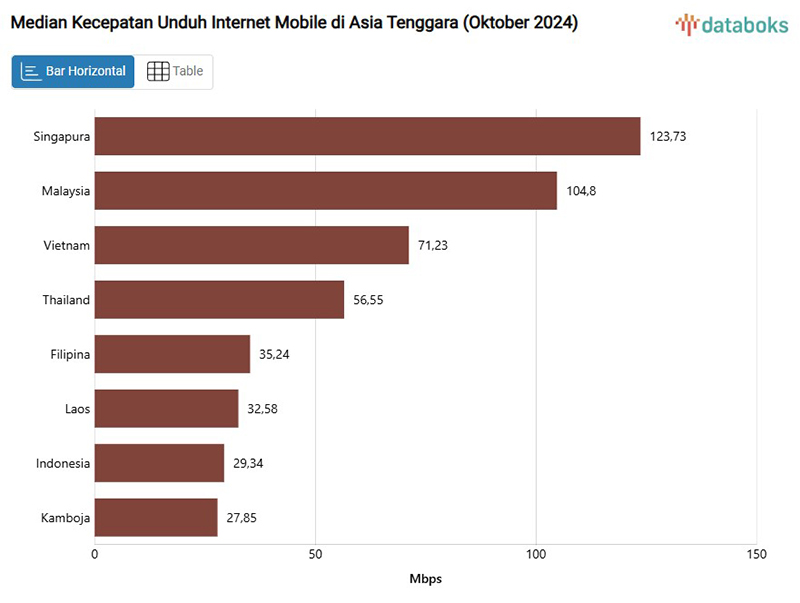 Mobile Internet Speed in Indonesia Still Lags Behind Other Countries – Haninpost
Teamviewer’s remote control solution has undeniable strengths when it comes to functionality, ecosystem, and business support. However, license costs are high. We expected that the amount spent would at least deliver reliable responsiveness and visual clarity for remote screens. In reality, however, our day-to-day experience often fell short of expectations. On poor connections, delays would stack up and the screen would freeze or become blurry. At times, even simple operations like opening menus or filling out forms felt sluggish. This isn’t a comment about the product’s technical prowess—Teamviewer brings proven global functionality, years of operational experience, extensive platform support, and workgroup management. But in our situation and workflow, the gap between “expensive means fast and slick” and what we really felt grew, becoming the inspiration for a new project. It made us ask: “Why does it feel so slow under our conditions?” The experience reinforced our belief that even with a proven product, if the environment doesn’t cooperate, perceived performance suffers. At the same time, the more challenging the network, the more important it is for software to work smartly within the limitations of the line and the devices.

That’s what led to NovaLINK. NovaLINK is not just “another remote control solution.” Our definition and measurement of performance is grounded in what we consider key factors from field experience: screen quality, latency, refresh rate, function in challenging networks, and resource usage. Every architectural choice—such as structuring the streaming pipeline or changing transfer strategies based on screen activity—ties back to these criteria. Before adding new features, we first check whether the core path meets our benchmarks. We are running performance tests under a range of scenarios, recreating real use patterns to find and fix bottlenecks. We evaluate both numbers and perceived experience: how it feels when transfer volume is reduced at the same resolution, how frequently screens break in lossy links, and so on. By fixing test environments and repeating measurements, we seek to distinguish real improvements from chance. The goal is not marketing hype, but a standard that convinces us. Priorities will differ depending on who uses the tool for what kind of work, so we believe it’s essential to determine them collaboratively at the start.
- Frame Drop Comparison Test in Identical Environments
- OS: Windows 10, 32bit
- CPU: Intel(R) Celeron(R) CPU J1900 @ 1.99GHz
- RAM: 4GB
- Video Source: https://youtu.be/KxMqSz8qVSg
- Test Case: Playing the video on the Host device and capturing the screen on the Client
To be frank, there’s no remote control software that is “optimal” for every network, every device, every industry. There are simply too many variables: bandwidth quality, firewall policies, relay server location, device specs, and even what other applications are running. The same solution may feel fast on an internal network but frustrating when connecting to an overseas branch. While you can’t just say “it’s bad software,” from the user’s point of view, the result is the same—slow workflow and mounting stress. Even so, we are developing NovaLINK with clear performance goals: reduce unnecessary delays, maintain readable screen quality, and ensure practical usability even on field connections. Rather than targeting “number one everywhere,” we choose to systematically expand—and be responsible for—the range we can truly support and improve. Unless we define these boundaries ourselves, it’s impossible to judge whether we’re making progress. Setting, and then validating, our own definitions of performance is what anchors a product’s direction.
We will continue refining our criteria based on real-world feedback and measurement results. The more transparent our definition of performance, the more honest a basis it becomes for anyone considering adoption. In future blog posts, I plan to share the specifics of our measurement methods, analysis, and the trial-and-error of our improvement process as concretely as possible.